Protein Docking
Netsains.Com - Tidak menggunakan komputer anda untuk sementara waktu? Anda dapat menyumbangkan waktu idle komputer anda kepada riset biomedis lanjutan yang bertujuan untuk menemukan pengobatan untuk HIV, Parkinson, arthritis, dan kanker payudara.
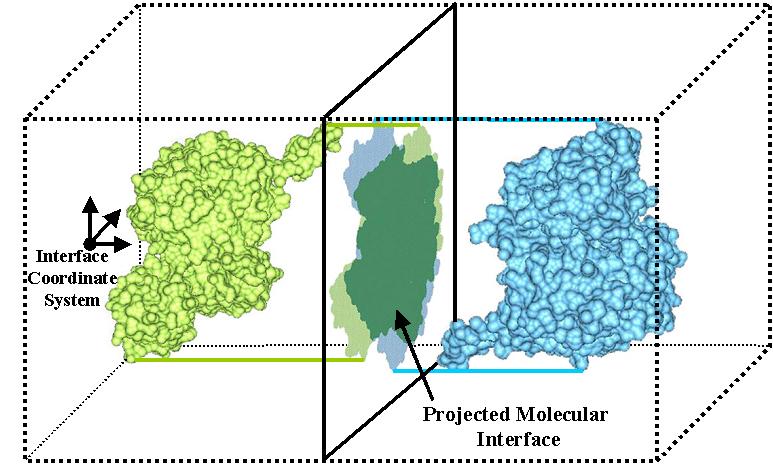
Melalui proyek ‘Docking@Home’ Universitas Delaware, yang dipimpin oleh Michela Taufer, asisten profesor dalam bidang ilmu komputer, dan didukung oleh Yayasan Sains Nasional USA, lebih dari 6000 sukarelawan dari seluruh dunia telah menyumbangkan waktu idle komputer mereka untuk melakukan kalkulasi ilmiah yang akan membantu dalam rangka menciptakan pengobatan baru untuk melawan penyakit-penyakit tersebut.Sebelum obat baru dapat diproduksi untuk pengujian laboratorium, peneliti harus menciptakan model molekuler dan mensimulasi interaksi mereka untuk mengungkapkan kandidat bagi pengobatan efektif. Simulasi tersebut dinamai ‘docking’ , demikian penjelasan Taufer.
Kombinasi molekul dan orientasi situs pengikatan mereka adalah tak terhingga, sehingga melakukan simulasi kombinasi memerlukan daya komputasi yang besar, demikian catatan Taufer. Superkomputer sering memiliki waktu tunggu atau terlalu mahal untuk digunakan dalam waktu panjang. Maka, peneliti akhirnya meminta bantuan sukarelawan, untuk mendistribusikan ratusan ribu task komputasi kepada jumlah banyak komputer. HIV-1 protease bertugas memotong HIV seperti gunting. Jika ilmuwan dapat menginhibis efek ini, maka virus tersebut tidak dapat bereproduksi, kata Taufer.
‘ Pada dasarnya, protein tersebut mengalami kerusakan, dan kami ingin tahu bagaimana molekul kecil dapat memperbaiki perilaku tersebut’, kata dia. Jika molekul pengikatan, yaitu ligan, dijatuhkan pada protein, secara efektif melakukan ‘docking’, ia dapat mengaktifkan atau mendeaktifkan protein tersebut, dan komputer dapat mensimulasi interaksi ini. Saat ini, penelitian ini berada dalam tahap validasi, proses tersebut bertujuan untuk mempelajari obat baru. ‘ Kami mentransformasi proses alamiah menjadi langkah komputas, mengembangkan suatu algorithma’, demikian penjelasan dia.
Menyumbangkan waktu idle komputer untuk melakukan kalkulasi ilmiah hanya memerlukan beberapa langkah sederhana yang dijelaskan pada situs web proyek ( http://docking.cis.udel.edu/ ). Program open source yang gratis, bernama BOINC ( Berkeley Open Infrastructure for Network Computing ), dikembangkan oleh Universitas Kalifornia, dan ditautkan pada Server Docking di Universitas Delaware dalam rangka menjadi bagian dari jaringan. Siklus idle komputer akan diakses secara otomatis jika sistim tidak digunakan.
Software BOINC juga digunakan dalam program Komunitas Dunia Grid IBM, yang memfokuskan pada penyakit yang terjadi karena kesalahan pelipatan protein, dan SETI@HOME, yang mencari tanda kehidupan intelejen diluar Bumi. Bahkan, Kevin Kreiser, seorang mahasiswa Doktorat di grup Taufer, telah mengembangkan software untuk ExSciTech (suatu sistim komputasi sukarelawan untuk eksplorasi sains, teknologi, dan kesehatan) yang bisa membuat para sukarelawan menggunakan Nintendo Wii untuk keperluan Docking.
Diterjemahkan dari:
University of Delaware (2009, June 21). Computer Idle? Now You Can Donate Its Time To Find A Cure For Major Diseases.ScienceDaily. Diterima March 29, 2010, from http://www.sciencedaily.com/releases/2009/06/090616193351.htm
Sumber gambar:
http://www.cs.umd.edu/gvil/
An inflatable movie screen is an inflatable framework with an attached projection screen. Inflatable screens are used for outdoor movies, film festivals, drive-in theaters, sports, social and other events which require outdoor projection.
The frame is typically inflated with the use of a high pressure blower. The blower continues to operate, ensuring the screen remains fully inflated. There are other types of inflatable screens that do not require a permanent inflation as they are virtually airtight and stay inflated without electricity for several days.[1]
In comparison to traditional and heavy steel constructions[2], inflatable screens can be set up only a few hours before the movie is to start and are taken down immediately after the movie screening. This can be ideal for vulnerable environments like parks or botanical gardens[3] and inner city locations with traffic in the daytime.
Inflatable screens reach sizes of up to 135 ft or 40 metres.[4].
[edit] See also
[edit] References
Teknologi diatas ditemukan oleh Prof Masatoshi Ishikawa dan Dr Takashi Komuro dari Universitas Tokyo, Jepang. Sebenernya teknologi ini dinamakan vision-based input interface. Dari video di atas, hanya ditunjukkan 1 jari, tetapi sebenarnya sistem ini mampu mengenali 5 jari dan dapat digunakan untuk mengetik pada virtual keyboard, mengklik, zoom, bahkan membuat gambar.
Sebuah cara interaksi yang baru antara manusia dan komputer. Teknologi revolusioner airscreen ini memudahkan manusia untuk lebih mengekspresikan dirinya. Namun, sepertinya butuh waktu transisi untuk beradaptasi ke teknologi ini. Terlihat dari beberapa komentar di situs youtube.com yang banyak menyatakan kerepotan jika teknologi ini mereka gunakan dan masih bertanya-tanya keuntungan apa yang mereka dapatkan jika beralih dari touchscreen ke airscreen ini. Di sisi lain, komentar-komentar tersebut merupakan masukan yang membangun bagi para developer teknologi ini.
Nah, bagi para pembaca yang ingin menikmati kecanggihan teknologi ini, sepertinya harus sedikit bersabar karena teknologi airscreen ini masih pada tahap pengembangan sehingga belum ada di pasaran. Dan bagi para pembaca yang merasa iri atau terbakar semangatnya (karena kecanggihan bangsa lain), mari segera berkontribusi untuk negeri ini. Tidak perlu menemukan hal yang baru, tetapi dengan melengkapi atau memperbaharui teknologi yang sudah ada, sudah merupakan kontribusi yang besar bagi kehidupan manusia 
Semoga dapat memancing kreatifitas Anda. 

R.O.H.A.N.: Blood Feud is a massively multiplayer online role-playing game (MMORPG). The game is a rich and expansive persistent online world, set on the continent of R.O.H.A.N.: Blood Feud. The land is full of quests to embark upon, from simple to glorious. Friends and enemies will be made and lost, spectacular battles will be fought, and an abundance of unique game features will keep players on the edge of their gaming seats. There are many features of the game that set it apart from more traditional MMORPGs, including:
- REVENGE: Players who have been slain in-game by another will have their killers automatically recorded on their "Hit List". Once resurrected, the slain can teleport to their killers for a chance at revenge.
- TOWNSHIP BATTLES: In-game groups - called 'guilds' - have the opportunity to rule each town within R.O.H.A.N.: Blood Feud. Other guilds may wage civil war with the ruling guild, with the chance to gain control of their own. In addition to treasure & riches, the right to tax all commercial exchanges within the town for one week goes to the winner.
- BUY & SELL SAFELY: There are several ways in which players can buy and sell goods within the game, including a website specially designed for player-to-player transactions.

Ohn, having created the world, entrusted it to the five lower gods who created races respectively and allowed them to thrive. The first five races to be created--Humans, Giants, Elves, Halflings, and Dark Elves--developed land conferred upon them by the gods with the knowledge and skills acquired from the divinities. Ohn created dragons to station at the borders of each territory, and prevented cultures from blending with each race maintaining autonomous cultures.
Soon thereafter, a serious incident unfolded in the Human kingdom. KrauteDel Lagos usurped the throne upon assassinating the reigning king, his reprobate older brother. Kraute's 13-year reign drew to a close after the late son ousted him with a military subversion.
The prophet Haillok, an assistant to Kraute, left Human territory with a number of Humans, and headed to Bahran Island in northern Rohan Continent. They were the forefathers of the Dhan race.
Thereafter, peace ensued for a time. All races erected countries and constructed capitals perpetuating growth. In the Human kingdom, the Paladin system was institutionalized rooted in devout faith, and Giants cultivated warriors to protect their motherland from harsh nature. Elves trained in magic healing and spearheaded cultural development, and Halflings opened the path to cohabitation by living among animals. Dark Elves maximized magic power as a means of self-defense. Perfecting such autonomous cultures respectively, each race would ostensibly exist in quietude.

With the dragons gone from obstructing territorial borders, the Human kingdom led an exploration and investigation of foreign territories. Human envoys visited the capital of every race, and interracial diplomacy with Humans as principals was launched. In the interim, Dekans, having settled in Bahran island and amassed power, encountered Dhans who'd settled in the island earlier. Upon the unanticipated encounter, the two races clashed escalating to all-out war terminating with an armistice only after a decade of profound destruction.
Having realized main god Ohn cannot be resurrected by merely obliterate the dragons, the five lower gods decide to annihilate all races on the continent and implement their intent. While countless animals and plants metamorphosed into monsters, fairies and a number of races, acting on the gods' orders, began to wage attack on the major continental races. Even in the midst of such turmoil interracial diplomacy continued and between Humans and Elves, two races who grew relatively close, the mixed-race Half Elves were born. Half Elves, who were looked askance at by both Humans and Elves ultimately were unable to dwell in either country. Instead, they sought a quiet refuge by constructing an independent village located between the two nations. Harboring profound animosity against both Humans and Elves, they cultivated their power with an independent character not relying on anyone.
In the meantime, paladins standing guard at Gratt Fortress, built to deter attacks, had a chance to encounter Roha, the god of the Human race. Having learned the intent of the gods to annihilate all races, paladins pleaded to Roha to retract the decision, but were possessed by Roha instead. Edwin, a paladin able to resist possession, roamed the continent, assembled colleagues and mounted resistance against the gods to no avail.

Their failure, unforgotten, began to propagate among the masses along with the truth. The rumor reached far and wide by way of hushed whispers. The gods have abandoned the world. The gods have turned their backs on all races. The gods are trying to obliterate life as we know it. Fear grew pervasive and ultimately, suspicion and wrath latent in the hearts of all organisms surfaced throwing the world into deeper turmoil.Beholding the world growing increasingly murky, Elf Queen Sila Mayor Regenon dispatched urgent messengers to all races to propose a round of peace talks.However, only Humans and Halflings appeared at the roundtable."
Dark Elves, vexed by the passive and weak temperament of the Elves, and Giants, chafed by preeminent Human prowess, brokered a clandestine alliance to drive Humans and Elves out of the continent. With only three nations, Elves, Humans and Halflings having entered into peace accords, the Giants' premier extends a hand to Half Elves who've been maintaining a neutral stance. In the interim, Dhans and Dekans, on standby upon declaring a truce, kept each other in check while observing continental maneuvers. But with the continental atmosphere escalating to impending warfare, and monsters emerging on Bahran Island, the two races were forced into cooperation.
With time passing, the world grew bogged deeper in a murky inferno, and all races unwittingly engaged in strife against all other races.To those who have not abandoned hope on the gods, those prepared to fight albeit waiting for a change of heart on the gods' end, and to the ones willing to fight as long as survival was ensured, the advent of an era of misery and darkness was dawning.
The era of yearning for fertile earth and prosperous life in the name of divinity has passed and the last inheritance of the earth ensconced in the abandoned land emerges from all corners. Now, it is time to till the earth with our own hands and wield tools to realize prosperity. Gathering Ohn’s blessings, we retaliate against the rage of the lower gods!
When the five lower gods, created by central god Ohn, spawned their own respective races, Ohn learned the appearance of those creatures were less than perfect, unlike his creations. Humans would vanish into thin air if the balance of the five powers conferred upon the five lower gods were upset. Ohn, deeming human life pitiable, extended his hands to land’s end and newly created grass, trees and rocks. Replicas of primordial nature, human effort could transform them into sturdy and utilitarian tools to enrich human life.
While most lower gods were moved by Ohn’s gesture to fill the fissures of imperfection lurking in the fibers of their creations, Roha, God of the Sun, demurred alleging the marriage of human intellect and Ohn’s gift is sufficient to pose material threat to the lower gods and argued that the natural resources must be usurped albeit to no avail. Abundant natural resources created by Ohn ultimately sowed the seeds for rapid continental growth, and mortal races waxed sufficiently powerful to present a threat to divine decisions.
Upon central god Ohn’s demise being torn asunder, Sun God Roha, the highest ranked of the lower gods, ordered Silva, Goddess of the Wind, to perpetuate decay of natural resources potentially threatening to the lower gods, and commanded Gail, God of the Land, to render the earth barren. However, as Silva grew increasingly depleted of her powers, concealed natural resources began to resurface one by one in all corners of the continent. As the shrewd races of R.O.H.A.N.: Blood Feud detected the resurgence, collection and production techniques, having fallen latent for more than a century, were being roused from darkness. Now what utilitarian form the earth’s inheritance will assume and impale the lower gods hinges on human acumen.

Beberapa di antara kita yang tidak merokok mungkin merasa tidak nyaman jika di sekitar kita ada orang yang merokok. Berbagai penelitian pun membuktikan jika para perokok pasif ini lebih berisiko tinggi terhadap penyakit dibandingkan para perokok aktif .
Kita sebagai perokok pasif pasti geram dengan hal ini. Gak ikut makan nangka kok kena getahnya. Sebagai perokok aktif pun beberapa mulai ada yang menyadari bahwa merokok tidak sehat dan ingin mengurangi atau berhenti sama sekali, namun dalam pelaksanaannya sulit sekali. Sebuah proses belajar akan perilaku merokok yang mendapat penguatan positif dari lingkungan dan tubuh, membuat perilaku merokok ini bertahan.
Awalnya mungkin mencoba, karena menghindari penguatan negatif seperti ejekan teman atau tidak diterima dalam kelompok tertentu. Ditambah lagi adanya penguat positif, seperti pujian teman jika merokok, atau mendapatkan kenikmatan dari menghisap rokok. Penguatan positif yang terus menerus, membuat perilaku merokok bertahan dan menetap, hingga sulit untuk dihentikan.
Beberapa alternatif cara dapat dilakukan untuk mengurangi perilaku merokok atau menghentikannya, seperti permen mint, hipnoterapi, terapi pengganti nikotif, hingga proses pembelajaran ulang yang dalam ilmu psikologi dikenal dengan istilah modifikasi perilaku. Prinsip utama dari teknik modifikasi perilaku ini adalah proses pembelajaran ulang tentang perilaku merokok. Jika semula merokok mendapatkan penguatan positif berupa kenikmatan, maka kali ini akan dikondisikan ulang dengan penguatan negatif agar perilaku merokok ini berkurang atau berhenti.
Beberapa teknik modifikasi perilaku dapat digunakan, termasuk memberikan hadiah untuk sebatang rokok yang tidak jadi dihisap dan sebaliknya memberikan hukuman untuk perilaku merokok. Terapis menjadwalkan dan membuat target perubahan perilaku, hingga perilaku merokok berkurang. Semula sehari berkurang 1 batang, esoknya 2 batang, hingga terus sesuai dengan target yang diharapkan.
Tidak membeli rokok dalam jumlah besar (misalnya satu atau dua pack) sehari, dapat juga digunakan sebagai alternatif untuk mengurangi merokok. Belilah sebatang setiap kali akan merokok. Misalnya kita biasa merokok tiap kali selesai makan, maka dengan membeli sebatang tiap kali akan merokok memiliki banyak resiko untuk gagal membeli, seperti tiba-tiba hujan, males, capek, toko tutup, atau hal lain yang akhirnya membuat kita susah untuk mendapatkan rokok.
Sudah pernah mencoba upaya di atas tetapi masih saja gagal? Maka kita dapat mengkombinasi antara teknik modifikasi perilaku dengan akupunktur. Teknik modifikasi perilaku berfungsi untuk mengkondisikan ulang perilaku, akupunktur membuat seseorang kehilangan penguat positif dari rokok. Sama dengan prinsip diet menggunakan media akupunktur, yakni menstimulasi titik-titik yang dapat menurunkan nafsu makan dan minum, disini distimulasi titik yang menimbulkan rasa nikmat dari rokok hilang. Ermanadji (2010), biasa menggunakan titik Ti Me (TianMexue; EX HN 5, dalam Alamsyah, 2000) untuk menghilangkan rasa nikmat dari rokok. Sudah terbiasa merokok, tiba-tiba berhenti maka ada rasa tidak enak, gelisah, rasa tidak nyaman di tenggorokan, maka dapat ditambahkan beberapa titik akupunktur tambahan untuk mengatasi masalah tersebut. Beberapa titik yang dapat disarankan Alamsyah (2009), antara lain: Tien Tu (RN, 22), San Yin Ciao (SP, 6), Yung Cuen (KI, 1), dan Sen Men (HT, 7). Semoga bermanfaat.
Referensi :
Alamsyah, I. (2009). Cara Lebih Mudah Menentukan Titik Terapi Acupoint. Jakarta: By Isa.
Ermanadji, B. (2010). Disampaikan dalam materi kuliah akupunktur. Malang: Sekolah Akupunktur Pengobatan “MANDIRI”.
)Teknologi diatas ditemukan oleh Prof Masatoshi Ishikawa dan Dr Takashi Komuro dari Universitas Tokyo, Jepang. Sebenernya teknologi ini dinamakan vision-based input interface. Dari video di atas, hanya ditunjukkan 1 jari, tetapi sebenarnya sistem ini mampu mengenali 5 jari dan dapat digunakan untuk mengetik pada virtual keyboard, mengklik, zoom, bahkan membuat gambar.
Sebuah cara interaksi yang baru antara manusia dan komputer. Teknologi revolusioner airscreen ini memudahkan manusia untuk lebih mengekspresikan dirinya. Namun, sepertinya butuh waktu transisi untuk beradaptasi ke teknologi ini. Terlihat dari beberapa komentar di situs youtube.com yang banyak menyatakan kerepotan jika teknologi ini mereka gunakan dan masih bertanya-tanya keuntungan apa yang mereka dapatkan jika beralih dari touchscreen ke airscreen ini. Di sisi lain, komentar-komentar tersebut merupakan masukan yang membangun bagi para developer teknologi ini.
Nah, bagi para pembaca yang ingin menikmati kecanggihan teknologi ini, sepertinya harus sedikit bersabar karena teknologi airscreen ini masih pada tahap pengembangan sehingga belum ada di pasaran. Dan bagi para pembaca yang merasa iri atau terbakar semangatnya (karena kecanggihan bangsa lain), mari segera berkontribusi untuk negeri ini. Tidak perlu menemukan hal yang baru, tetapi dengan melengkapi atau memperbaharui teknologi yang sudah ada, sudah merupakan kontribusi yang besar bagi kehidupan manusia
Semoga dapat memancing kreatifitas Anda.

A touchscreen is an electronic visual display that can detect the presence and location of a touch within the display area. The term generally refers to touch or contact to the display of the device by a finger or hand. Touchscreens can also sense other passive objects, such as a pen. However, if the object sensed is active, as with a light pen, the term touchscreen is generally not applicable. The ability to interact physically with what is shown on a display (a form of "direct manipulation") typically indicates the presence of a touchscreen.
The touchscreen has two main attributes. First, it enables one to interact with what is displayed directly on the screen, where it is displayed, rather than indirectly with a mouse or touchpad. Secondly, it lets one do so without requiring any intermediate device, again, such as a stylus that needs to be held in the hand. Such displays can be attached to computers or, as terminals, to networks. They also play a prominent role in the design of digital appliances such as the personal digital assistant (PDA), satellite navigation devices, mobile phones, and video games.
History
Touchscreens emerged from academic and corporate research labs in the second half of the 1960s. One of the first places where they gained some visibility was in the terminal of a computer-assisted learning terminal that came out in 1972 as part of the PLATO project. They have subsequently become familiar in kiosk systems, such as in retail and tourist settings, on point of sale systems, on ATMs and on PDAs where a stylus is sometimes used to manipulate the GUI and to enter data. The popularity of smart phones, PDAs, portable game consoles and many types of information appliances is driving the demand for, and the acceptance of, touchscreens.
The HP-150 from 1983 was probably the world's earliest commercial touchscreen computer. It did not actually have a touchscreen in the strict sense, but a 9" Sony CRT surrounded by infrared transmitters and receivers which detect the position of any non-transparent object on the screen.
Until the early 1980s, most consumer touchscreens could only sense one point of contact at a time, and few have had the capability to sense how hard one is touching. This is starting to change with the commercialisation of multi-touch technology.
Touchscreens are popular in heavy industry and in other situations, such as museum displays or room automation, where keyboard and mouse systems do not allow a satisfactory, intuitive, rapid, or accurate interaction by the user with the display's content.
Historically, the touchscreen sensor and its accompanying controller-based firmware have been made available by a wide array of after-market system integrators and not by display, chip or motherboard manufacturers. With time, however, display manufacturers and chip manufacturers worldwide have acknowledged the trend toward acceptance of touchscreens as a highly desirable user interface component and have begun to integrate touchscreen functionality into the fundamental design of their products.
Technologies
There are a number of types of touchscreen technology.
Resistive
A resistive touchscreen panel is composed of several layers, the most important of which are two thin, metallic, electrically conductive layers separated by a narrow gap. When an object, such as a finger, presses down on a point on the panel's outer surface the two metallic layers become connected at that point: the panel then behaves as a pair of voltage dividers with connected outputs. This causes a change in the electrical current which is registered as a touch event and sent to the controller for processing.
Surface acoustic wave
Surface acoustic wave (SAW) technology uses ultrasonic waves that pass over the touchscreen panel. When the panel is touched, a portion of the wave is absorbed. This change in the ultrasonic waves registers the position of the touch event and sends this information to the controller for processing. Surface wave touch screen panels can be damaged by outside elements. Contaminants on the surface can also interfere with the functionality of the touchscreen.
Capacitive
A capacitive touchscreen panel consists of an insulator such as glass, coated with a transparent conductor such as indium tin oxide (ITO).[2][3] As the human body is also a conductor, touching the surface of the screen results in a distortion of the body's electrostatic field, measurable as a change in capacitance. Different technologies may be used to determine the location of the touch. The location can be passed to a computer running a software application which will calculate how the user's touch relates to the computer software.
Surface capacitance
In this basic technology, only one side of the insulator is coated with a conductive layer. A small voltage is applied to the layer, resulting in a uniform electrostatic field. When a conductor, such as a human finger, touches the uncoated surface, a capacitor is dynamically formed. The sensor's controller can determine the location of the touch indirectly from the change in the capacitance as measured from the four corners of the panel. As it has no moving parts, it is moderately durable but has limited resolution, is prone to false signals from parasitic capacitive coupling, and needs calibration during manufacture. It is therefore most often used in simple applications such as industrial controls and kiosks.
Projected capacitance
Projected Capacitive Touch (PCT) technology is a capacitive technology which permits more accurate and flexible operation, by etching the conductive layer. An XY array is formed either by etching a single layer to form a grid pattern of electrodes, or by etching two separate, perpendicular layers of conductive material with parallel lines or tracks to form the grid (comparable to the pixel grid found in many LCD displays).
Applying voltage to the array creates a grid of capacitors. Bringing a finger or conductive stylus close to the surface of the sensor changes the local electrostatic field. The capacitance change at every individual point on the grid can be measured to accurately determine the touch location.[5] The use of a grid permits a higher resolution than resistive technology and also allows multi-touch operation. The greater resolution of PCT allows operation without direct contact, such that the conducting layers can be coated with further protective insulating layers, and operate even under screen protectors, or behind weather and vandal-proof glass. However, conductive smudges and the like can seriously interfere with the resolution, making multiple touches necessary to get the desired functionality. Such conductive smudges come mostly from sticky or sweaty finger tips, especially in high humidity environments. Collected dust, which adheres to the screen due to the moisture from fingertips, is a serious drawback for the long-life operation of PCT.
PCT is used in a wide range of applications including point of sale systems, smartphones, and public information kiosks. Visual Planet's ViP Interactive Foil is an example of a kiosk PCT product, where a gloved hand can register a touch on a sensor surface through a glass window.[6] Examples of consumer devices using projected capacitive touchscreens include LG's LG KE850, Apple Inc.'s iPhone and iPod Touch, HTC's HD2, G1, and HTC Hero, Motorola's Droid, Palm Inc.'s Palm Pre and Palm Pixi and more recently the LG KM900 Arena, Microsoft's Zune HD, Sony Walkman X series, Sony Ericsson's Aino and now Vidalco's Edge, D1 and Jewel, the Nokia X6 phone and Google's Nexus One.
Strain gauge
In a strain gauge configuration, also called force panel technology, the screen is spring-mounted on the four corners and strain gauges are used to determine deflection when the screen is touched.[7] This technology has been around since the 1960s but new advances by Vissumo and F-Origin have made the solution commercially viable.[8] It can also measure the Z-axis and the force of a person's touch. Such screens are typically used in exposed public systems such as ticket machines due to their resistance to vandalism.
Optical imaging
A relatively-modern development in touchscreen technology, two or more image sensors are placed around the edges (mostly the corners) of the screen. Infrared backlights are placed in the camera's field of view on the other sides of the screen. A touch shows up as a shadow and each pair of cameras can then be triangulated to locate the touch or even measure the size of the touching object (see visual hull). This technology is growing in popularity, due to its scalability, versatility, and affordability, especially for larger units.
Dispersive signal technology
Introduced in 2002 by 3M, this system uses sensors to detect the mechanical energy in the glass that occurs due to a touch. Complex algorithms then interpret this information and provide the actual location of the touch.[10] The technology claims to be unaffected by dust and other outside elements, including scratches. Since there is no need for additional elements on screen, it also claims to provide excellent optical clarity. Also, since mechanical vibrations are used to detect a touch event, any object can be used to generate these events, including fingers and stylus. A downside is that after the initial touch the system cannot detect a motionless finger
Acoustic pulse recognition
This system, introduced by Tyco International's Elo division in 2006, uses more than two piezoelectric transducers located at some positions of the screen to turn the mechanical energy of a touch (vibration) into an electronic signal.[11] The screen hardware then uses an algorithm to determine the location of the touch based on the transducer signals. This process is similar to triangulation used in GPS. The touchscreen itself is made of ordinary glass, giving it good durability and optical clarity. It is usually able to function with scratches and dust on the screen with good accuracy. The technology is also well suited to displays that are physically larger. As with the Dispersive Signal Technology system, after the initial touch, a motionless finger cannot be detected. However, for the same reason, the touch recognition is not disrupted by any resting objects.
Coded LCD: Bidirectional Screen
A new system that turns LCD displays into giant cameras that provide gestural control of objects on-screen [12] was introduced by MIT Media Lab in December, 2009. Instead of an LCD, an array of pinholes is placed in front of sensors. Light passing through each pinhole strikes a small block of sensors producing a low-resolution image. Since each pinhole image is taken from a slightly different position, all combined images provide a good depth information about the sensed image.
Pinholes are problematic because they allow very little light to reach the sensors, requiring impractically long exposure times. Instead of pinholes, an array of liquid crystals could work similarly but more effectively: The LCD's panel is composed of patterns of 19-by-19 blocks, each divided into a regular pattern of differently sized black-and-white rectangles. Each white area of the bi-colored pixels allows light to pass through. Background software uses 4D light fields to calculate depth map, changes the scene, and collects gesture information. The LCD alternates between mask pattern display and a normal scene display at a very high frequency/rate.
Construction
There are several principal ways to build a touchscreen. The key goals are to recognize one or more fingers touching a display, to interpret the command that this represents, and to communicate the command to the appropriate application.
In the most popular techniques, the capacitive or resistive approach, there are typically four layers;
- Top polyester layer coated with a transparent metallic conductive coating on the bottom
- Adhesive spacer
- Glass layer coated with a transparent metallic conductive coating on the top
- Adhesive layer on the backside of the glass for mounting.
When a user touches the surface, the system records the change in the electrical current that flows through the display.
Dispersive-signal technology which 3M created in 2002, measures the piezoelectric effect — the voltage generated when mechanical force is applied to a material — that occurs chemically when a strengthened glass substrate is touched.
There are two infrared-based approaches. In one, an array of sensors detects a finger touching or almost touching the display, thereby interrupting light beams projected over the screen. In the other, bottom-mounted infrared cameras record screen touches.
In each case, the system determines the intended command based on the controls showing on the screen at the time and the location of the touch.
Development
Virtually all of the significant touchscreen technology patents were filed during the 1970s and 1980s and have expired. Touchscreen component manufacturing and product design are no longer encumbered by royalties or legalities with regard to patents and the manufacturing of touchscreen-enabled displays on all kinds of devices is widespread.
The development of multipoint touchscreens facilitated the tracking of more than one finger on the screen, thus operations that require more than one finger are possible. These devices also allow multiple users to interact with the touchscreen simultaneously.
With the growing acceptance of many kinds of products with an integral touchscreen interface the marginal cost of touchscreen technology is routinely absorbed into the products that incorporate it and is effectively eliminated. As typically occurs with any technology, touchscreen hardware and software has sufficiently matured and been perfected over more than three decades to the point where its reliability is unassailable. As such, touchscreen displays are found today in airplanes, automobiles, gaming consoles, machine control systems, appliances and handheld display devices of every kind. With the influence of the multi-touch-enabled iPhone, the touchscreen market for mobile devices is projected to produce US$5 billion in 2009.[13]
The ability to accurately point on the screen itself is taking yet another step with the emerging graphics tablet/screen hybrids.
Ergonomics and usage
Finger stress
An ergonomic problem of touchscreens is their stress on human fingers when used for more than a few minutes at a time, since significant pressure can be required for certain types of touchscreen. This can be alleviated for some users with the use of a pen or other device to add leverage and more accurate pointing. However, the introduction of such items can sometimes be problematic depending on the desired use case (for example, public kiosks such as ATMs). Also, fine motor control is better achieved with a stylus, because a finger is a rather broad and ambiguous point of contact with the screen itself.
Fingernail as stylus

These ergonomic issues of direct touch can be bypassed by using a different technique, provided that the user's fingernails are either short or sufficiently long.[citation needed] Rather than pressing with the soft skin of an outstretched fingertip, the finger is curled over, so that the top of the forward edge of a fingernail can be used instead. The thumb is optionally used to provide support for the finger or for a long fingernail, from underneath. This method does not work on capacitive touch screens, as fingernails lack the electrical properties required to be sensible by capacitive sensing.
The fingernail's hard, curved surface contacts the touchscreen at a single very small point. Therefore, much less finger pressure is needed, much greater precision is possible (approaching that of a stylus, with a little experience), much less skin oil is smeared onto the screen, and the fingernail can be silently moved across the screen with very little resistance[citation needed], allowing for selecting text, moving windows, or drawing lines.
The human fingernail consists of keratin which has a hardness and smoothness similar to the tip of a stylus (and so will not typically scratch a touchscreen). Alternately, very short stylus tips are available, which slip right onto the end of a finger; this increases visibility of the contact point with the screen.
Fingerprints
Touchscreens can suffer from the problem of fingerprints on the display. This can be mitigated by the use of materials with optical coatings designed to reduce the visible effects of fingerprint oils, such as the oleophobic coating used in the iPhone 3G S, or by reducing skin contact by using a fingernail or stylus.
Combined with haptics
The user experience with touchscreens without tactile feedback or haptics can be difficult due to latency or other factors. Research from the University of Glasgow Scotland [Brewster, Chohan, and Brown 2007] demonstrates that sample users reduce input errors (20%), increase input speed (20%), and lower their cognitive load (40%) when touchscreens are combined with haptics or tactile feedback, [vs. non-haptic touchscreens].
"Gorilla Arm"
The Jargon File dictionary of hacker slang defined Gorilla Arm as the failure to understand the ergonomics of vertically mounted touch screens for prolonged use. The proposition is that human arm held in an unsupported horizontal position rapidly becomes fatigued and painful, the so-called "gorilla arm".[14] It is often cited as a prima facie example of what not to do in ergonomics, despite contrary evidence.[citation needed] Vertical touchscreens still dominate in applications such as ATMs and data kiosks in which the usage is too brief to be an ergonomic problem.[citation needed]
Discomfort might be caused by previous poor posture and atrophied muscular systems caused by limited physical exercise [15]. Fine art painters and draughstmen have worked in similar postures with vertically mounted surfaces to draw on for millenia.[16]
Comparison of touchscreen technologies
| Technology | 4-Wire | SAW | 5-Wire | Infrared | Capacitive |
|---|---|---|---|---|---|
| Durability | 3 year | 5 Year | 5 Year | 5 Year | 2 Year |
| Stability | High | Higher | High | High | Ok |
| Transparency | Bad | Good | Bad | Good | Ok |
| Installation | Built-in/Onwall | Built-in/Onwall | Built-in/Onwall | Onwall | Built-in |
| Touch | Anything | Finger/Pen | Anything | Finger/Pen | Conductive |
| Intense light-resistant | Good | Good | Good | Bad | Bad |
| Response time | <10ms | 10ms | <15ms | <20ms | <15ms |
| Following Speed | Good | Low | Good | Good | Good |
| Excursion | No | Small | Big | Big | Big |
| Monitor option | CRT or LCD | CRT or LCD | CRT or LCD | CRT or LCD | CRT or LCD |
| Waterproof | Good | Ok | Good | Ok | Good |
References
- Shneiderman, B. Touch screens now offer compelling uses. IEEE Software, 8, 2, (March 1991) 93-94, 107.
- Potter, R., Weldon, L. and Shneiderman, B. Improving the accuracy of touch screen: An experimental evaluation of three strategies. Proc. CHI'88. (Washington, D.C., May, 1988), ACM Press, 27-32.
- Sears, A., Plaisant, C., and Shneiderman, B. A new era for high precision touchscreens. In Advances in Human-Computer Interaction, 3 (1992), Hartson, R and Hix, D. (Eds.), Ablex, NJ, 1-33.
- Sears, A. and Shneiderman, B. High precision touchscreen: Design strategies and comparison with a mouse. Int. J. of Man-Machine Studies, 34 (1991), 593-613.